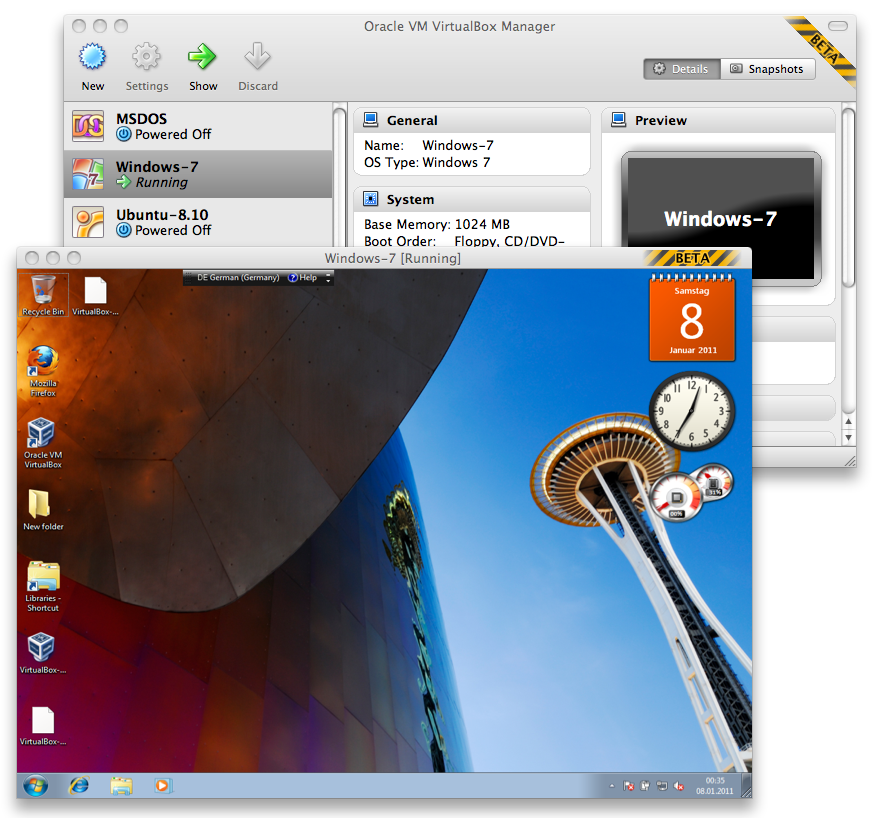
As you may know, developing for multiple platforms is one of my strengths. Strictly speaking, it’s a basic requirement if you are involved in such a product like VirtualBox, which runs on every major (and several minor) platform available today. Beside the GUI, which uses Qt and therewith is portable without any additional cost (which isn’t fully true if you want real native look and feel on every platform, especially on Mac OS X), all the rest of VirtualBox is written in a portable way. This is done by using only C/C++ and Assembler when necessary. Everything which needs a different approach, because of the design of the OS (and the API’s which are available there), is implemented in a platform dependent way. In the history of VirtualBox, several modules are created and grown by the time, which makes it really easy to deal with this differences. For stuff like file handling, paths, strings, semaphores or any other basic functionality, you can just use the modules which are available. On the other side it might be necessary, for a new feature we implement, to write it from the ground. In the following post I will show how to create a file shortcut for the three major operation systems available today.
Why do you want to use file shortcuts
On the classical UNIX systems you have hard and soft links. These are implemented by the filesystem and make it possible to link to another file or folder without any trouble. Most of the time soft links are used, but it really depends on the use case. Unfortunately these kind of links are not available on Windows (yes, I know there are also hard links and junctions on NTFS, but they are not common and difficult to handle), these links doesn’t allow any additional attributes. For example one like to add a different icon to the link or provide more information through a comment field. Beside on Mac OS X, shortcuts can also be work as an application launcher, where the link contain the information what application should be started and how. In contrast to filesystem links which are handled by the operation system, these shortcuts are handled by the window system (or shell) running on the host (which doesn’t mean there is no filesystem support for it). On Windows this is the Explorer, on Mac OS X the Finder and on Linux a freedesktop.org conforming file manager.
Creating a Desktop file on Linux
Desktop files on Linux (or any other UNIX system which conforms to freedesktop.org) is easy. It’s a simple text file which implement the Desktop Entry Specification. In version 1.0 there are 18 possible entries, where not all of them are mandatory. In the following example I use Qt to write these files, but it should be no problem to use any other toolkit or plain C.
bool createShortcut(const QString &strSrcFile,
                    const QString &strDstPath,
                    const QString &strName)
{
 QFile link(strDstPath + QDir::separator() + strName + ".desktop");
 if (link.open(QFile::WriteOnly | QFile::Truncate))
 {
  QTextStream out(&link);
  out.setCodec("UTF-8");
  out << "[Desktop Entry]" << endl
      << "Encoding=UTF-8" << endl
      << "Version=1.0" << endl
      << "Type=Link" << endl
      << "Name=" << strName << endl
      << "URL=" << strSrcFile << endl
      << "Icon=icon-name" << endl;
  return true;
 }
 return false;
}
Replace icon-name by a registered icon on the system and you are done.
Creating a Shell link on Windows
Windows provides an interface for IShellLink since Windows XP. The following example shows how to use it:
bool createShortcut(LPCSTR lpszSrcFile,
                    LPCSTR lpszDstPath,
                    LPCSTR lpszName)
{
 IShellLink *pShl = NULL;
 IPersistFile *pPPF = NULL;
 HRESULT rc = CoCreateInstance(CLSID_ShellLink,
                               NULL,
                               CLSCTX_INPROC_SERVER,
                               IID_IShellLink,
                               (void**)(&pShl));
 if (FAILED(rc))
  return false;
 do
 {
  rc = pShl->SetPath(lpszSrcFile);
  if (FAILED(rc))
   break;
  rc = pShl->QueryInterface(IID_IPersistFile, (void**)&pPPF);
  if (FAILED(rc))
   break;
  WORD wsz[MAX_PATH];
  TCHAR path[MAX_PATH] = { 0 };
  lstrcat(path, lpszDstPath);
  lstrcat(path, "\");
  lstrcat(path, lpszName);
  lstrcat(path, ".lnk");
  MultiByteToWideChar(CP_ACP, 0, buf, -1, wsz, MAX_PATH);
  rc = pPPF->Save(wsz, TRUE);
 } while(0);
 if (pPPF)
  pPPF->Release();
 if (pShl)
  pShl->Release();
 return SUCCEEDED(rc);
}
As you may noticed this uses COM. Many API’s on Windows using the COM interface to communicate between processes. If you don’t use COM in your application you have to initialize it first. This is achieved by adding the following call to the front of the function:
 if (FAILED(CoInitialize(NULL))
  return false;
Depending on your application it might be worth to unitialize COM after usage by appending the following to the function:
CoUninitialize();
The function itself isn’t any magic. It gets a COM interface to the IShellLink interface and then work with it, by setting the source path and adding a target path by using the IPersistFile interface. As I wrote before you could do much more. Providing a path to a specific application or adding your own parameters is no problem. Have a look at the documentation.
Creating an Alias file on Mac OS X
Shortcut files on Mac OS X are a little bit different. At first, they aren’t one. There are the classical filesystem links and Alias files. Alias files are links which targeting a specific file, but they haven’t all the possibilities of shortcuts like on Windows or Linux. As the name suggest they are really only an alias for another file or directory. So specifying an application to start or things like that aren’t possible. Anyway they allow changing the icon and they are more persistent than on Window or Linux cause they are working with several attributes of the target file. Even if you rename or move the target, an Alias file will resolve the target correctly (if it is possible). On the other side, being such special means also being hard to create. In principle there are two possibilities. The first one is, creating a file which is no file at all, but has several resources forks attached. Therefor you need to know exactly how Alias files are built of and make sure with every release of Mac OS X you are following the development. There is a free project which does exactly that: NDAlias. If you are like me and a little bit more lazy, you ask someone who should know how to create Alias files. This is Finder. Although writing the files itself isn’t easy, asking the Finder to do the job is not really easier, cause the information about doing exactly that are really rare. The following code shows how to achieve it:
bool createShortcut(NSString *pstrSrcFile,
                    NSString *pstrDstPath,
                    NSString *pstrName)
{
 /* First of all we need to figure out which process Id the Finder
  * currently has. */
 NSWorkspace *pWS = [NSWorkspace sharedWorkspace];
 NSArray *pApps = [pWS launchedApplications];
 bool fFFound = false;
 ProcessSerialNumber psn;
 for (NSDictionary *pDict in pApps)
 {
  if ([[pDict valueForKey:@"NSApplicationBundleIdentifier"]
         isEqualToString:@"com.apple.finder"])
  {
   psn.highLongOfPSN = [[pDict
                          valueForKey:@"NSApplicationProcessSerialNumberHigh"] intValue];
   psn.lowLongOfPSN  = [[pDict
                          valueForKey:@"NSApplicationProcessSerialNumberLow"] intValue];
   fFFound = true;
   break;
  }
 }
 if (!fFFound)
  return false;
 /* Now the event fun begins. */
 OSErr err = noErr;
 AliasHandle hSrcAlias = 0;
 AliasHandle hDstAlias = 0;
 do
 {
  /* Create a descriptor which contains the target psn. */
  NSAppleEventDescriptor *finderPSNDesc = [NSAppleEventDescriptor
                                            descriptorWithDescriptorType:typeProcessSerialNumber
                                            bytes:&psn
                                            length:sizeof(psn)];
  if (!finderPSNDesc)
   break;
  /* Create the Apple event descriptor which points to the Finder
   * target already. */
  NSAppleEventDescriptor *finderEventDesc = [NSAppleEventDescriptor
                                              appleEventWithEventClass:kAECoreSuite
                                              eventID:kAECreateElement
                                              argetDescriptor:finderPSNDesc
                                              returnID:kAutoGenerateReturnID
                                              transactionID:kAnyTransactionID];
  if (!finderEventDesc)
   break;
  /* Create and add an event type descriptor: Alias */
  NSAppleEventDescriptor *osTypeDesc = [NSAppleEventDescriptor descriptorWithTypeCode:typeAlias];
  if (!osTypeDesc)
   break;
  [finderEventDesc setParamDescriptor:osTypeDesc forKeyword:keyAEObjectClass];
  /* Now create the source Alias, which will be attached to the event. */
  err = FSNewAliasFromPath(nil, [pstrSrcFile fileSystemRepresentation], 0, &hSrcAlias, 0);
  if (err != noErr)
   break;
  char handleState;
  handleState = HGetState((Handle)hSrcAlias);
  HLock((Handle)hSrcAlias);
  NSAppleEventDescriptor *srcAliasDesc = [NSAppleEventDescriptor
                                           descriptorWithDescriptorType:typeAlias
                                           bytes:*hSrcAlias
                                           length:GetAliasSize(hSrcAlias)];
  if (!srcAliasDesc)
   break;
  [finderEventDesc setParamDescriptor:srcAliasDesc
    forKeyword:keyASPrepositionTo];
  HSetState((Handle)hSrcAlias, handleState);
  /* Next create the target Alias and attach it to the event. */
  err = FSNewAliasFromPath(nil, [pstrDstPath fileSystemRepresentation], 0, &hDstAlias, 0);
  if (err != noErr)
   break;
  handleState = HGetState((Handle)hDstAlias);
  HLock((Handle)hDstAlias);
  NSAppleEventDescriptor *dstAliasDesc = [NSAppleEventDescriptor
                                           descriptorWithDescriptorType:t ypeAlias
                                           bytes:*hDstAlias
                                           length:GetAliasSize(hDstAlias)];
  if (!dstAliasDesc)
   break;
  [finderEventDesc setParamDescriptor:dstAliasDesc
    forKeyword:keyAEInsertHere];
  HSetState((Handle)hDstAlias, handleState);
  /* Finally a property descriptor containing the target
   * Alias name. */
  NSAppleEventDescriptor *finderPropDesc = [NSAppleEventDescriptor recordDescriptor];
  if (!finderPropDesc)
   break;
  [finderPropDesc setDescriptor:[NSAppleEventDescriptor descriptorWithString:pstrName]
    forKeyword:keyAEName];
  [finderEventDesc setParamDescriptor:finderPropDesc forKeyword:keyAEPropData];
  /* Now send the event to the Finder. */
  err = AESend([finderEventDesc aeDesc],
               NULL,
               kAENoReply,
               kAENormalPriority,
               kNoTimeOut,
               0,
               nil);
 } while(0);
 /* Cleanup */
 if (hSrcAlias)
  DisposeHandle((Handle)hSrcAlias);
 if (hDstAlias)
  DisposeHandle((Handle)hDstAlias);
 return err == noErr ? true : false;
}
Although the code above looks a little bit scary, it does not much. It fetch the process serial number of the current Finder process, creates an Application event for creating an Alias file and send this event to the Finder.
Conclusion
Beside showing how to create file shortcuts on different platforms, this article also shows which work is necessary to create platform independent code. It’s a simple example. But it also makes clear that one simple solution for platform one, not necessarily mean it’s such simple on platform two.
Making this easy accessible to any developer is the next step. I will leave this exercise to the reader, but have a look at the platform code of the VirtualBox GUI and the corresponding Makefile.